
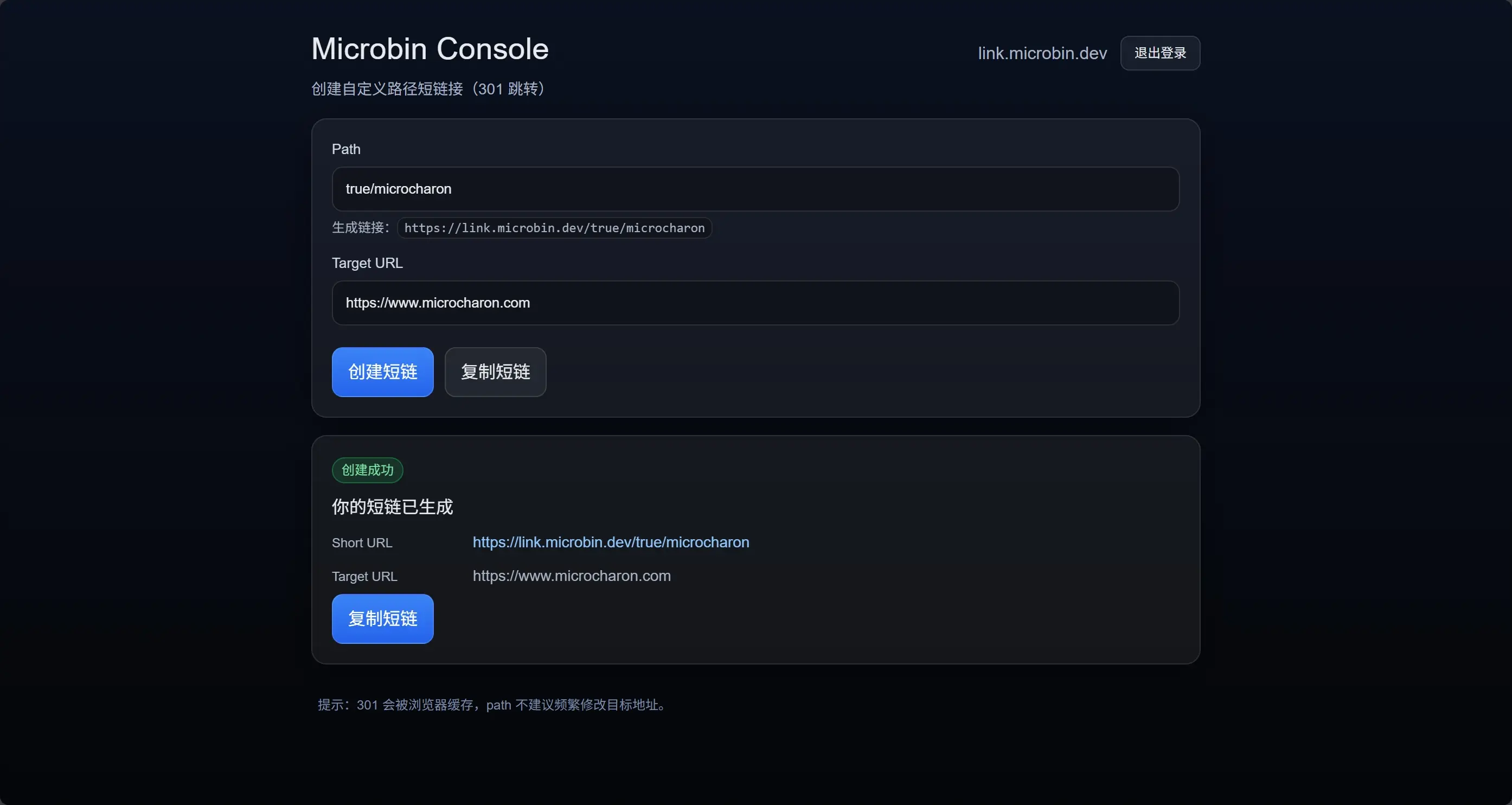
总览
- DynamoDB 表:
MicrobinLinks - Lambda:
microbin-redirect - API Gateway(HTTP API):
Microbin Short Links,Microbin Short Link Admin - CloudFront:已创建分配(接下来配置 Origin/Behavior/证书/域名)
- Cloudflare DNS:
link.microbin.dev指向 CloudFront link.microbin.dev:短链跳转入口- 访问
https://link.microbin.dev/{path}→ 301 跳转到目标 URL
- 访问
api.link.microbin.dev:管理 API(创建/查询/删除短链)- 你已验证
POST https://api.link.microbin.dev/links返回 201 正常
- 你已验证
console.link.microbin.dev:管理控制台前端(Next.js,部署在 Vercel)- 用于创建短链、展示生成结果、复制短链等
搭建跳转 API
Step 1:创建 DynamoDB 表
- 进入 DynamoDB → Tables → Create table
填:
- Table name:
MicrobinLinks - Partition key:
path(String)
- Table name:
- 其他保持默认(On-demand capacity 推荐,省心)
- Create table
可选增强(先不做也行):TTL 字段 expireAt(Number),后续可以在表设置里启用 TTL。Step 2:创建 Lambda
- 进入 Lambda → Create function
选择:
- Author from scratch
- Function name:
microbin-redirect - Runtime:Node.js 24.x(或 Python 3.14 也行;下面以 Node.js 为例)
- Create function
2.1 配置环境变量
在 Lambda → Configuration → Environment variables 添加:
TABLE_NAME=MicrobinLinks
2.2 配置 IAM 权限
- 打开 Lambda → Configuration → Permissions
- 点击 Execution role(会跳到 IAM Role)
- Add permissions → Create inline policy
- 选择 JSON,填入(把 region/account-id 替换;或者先用 Resource = "*" 快速验证,跑通后再收紧):
{
  "Version": "2012-10-17",
  "Statement": [
    {
      "Sid": "DynamoRead",
      "Effect": "Allow",
      "Action": [
        "dynamodb:GetItem"
      ],
      "Resource": "arn:aws:dynamodb:YOUR-REGION:YOUR-ACCOUNT-ID:table/MicrobinLinks"
    }
  ]
}
2.3 写 Lambda 代码
进入 Lambda → Code,把 index.mjs(或 index.js)改成下面逻辑:
import { DynamoDBClient } from "@aws-sdk/client-dynamodb";
import { DynamoDBDocumentClient, GetCommand } from "@aws-sdk/lib-dynamodb";

const ddb = DynamoDBDocumentClient.from(new DynamoDBClient({}));

const TABLE_NAME = process.env.TABLE_NAME;

// Reserved paths to avoid conflicts with admin/api endpoints
const RESERVED_PREFIXES = ["admin", "__admin", "api", ".well-known"];

function normalizePath(rawPath) {
  // rawPath example: "/foo/bar" or "foo/bar"
  const p = (rawPath || "").trim();
  const noLeading = p.startsWith("/") ? p.slice(1) : p;

  // Decode URL-encoded path safely
  let decoded = noLeading;
  try {
    decoded = decodeURIComponent(noLeading);
  } catch {
    // If decode fails, keep original
  }

  // Remove trailing slash (optional; choose one consistent rule)
  const cleaned = decoded.replace(/\/+$/, "");

  return cleaned;
}

function isReserved(path) {
  if (!path) return true;
  const first = path.split("/")[0];
  return RESERVED_PREFIXES.includes(first);
}

export const handler = async (event) => {
  // HTTP API (API Gateway v2) usually provides: event.rawPath
  const rawPath = event?.rawPath ?? event?.path ?? "/";
  const path = normalizePath(rawPath);

  // Root path handling: you can choose to 404 or redirect to a homepage
  if (!path) {
    return {
      statusCode: 404,
      headers: {
        "Content-Type": "text/plain; charset=utf-8",
        "Cache-Control": "public, max-age=60"
      },
      body: "Not Found"
    };
  }

  if (isReserved(path)) {
    return {
      statusCode: 404,
      headers: {
        "Content-Type": "text/plain; charset=utf-8",
        "Cache-Control": "public, max-age=60"
      },
      body: "Not Found"
    };
  }

  const resp = await ddb.send(
    new GetCommand({
      TableName: TABLE_NAME,
      Key: { path }
    })
  );

  const item = resp.Item;

  if (!item || !item.targetUrl || item.enabled === false) {
    return {
      statusCode: 404,
      headers: {
        "Content-Type": "text/plain; charset=utf-8",
        "Cache-Control": "public, max-age=60"
      },
      body: "Not Found"
    };
  }

  const targetUrl = String(item.targetUrl);

  // Basic validation to avoid invalid Location
  if (!(targetUrl.startsWith("https://") || targetUrl.startsWith("http://"))) {
    return {
      statusCode: 500,
      headers: {
        "Content-Type": "text/plain; charset=utf-8"
      },
      body: "Invalid target URL"
    };
  }

  // 301 is cached by browsers; adjust max-age carefully
  const maxAge = Number(item.maxAge ?? 3600); // default 1h

  return {
    statusCode: 301,
    headers: {
      Location: targetUrl,
      "Cache-Control": `public, max-age=${maxAge}`,
      // Optional: helps some clients, not required
      "Content-Type": "text/plain; charset=utf-8"
    },
    body: `Redirecting to ${targetUrl}`
  };
};
然后 Deploy。
说明:这里做了保留前缀(admin/api 等)与基础校验。你后续做管理端 API 时不容易冲突。
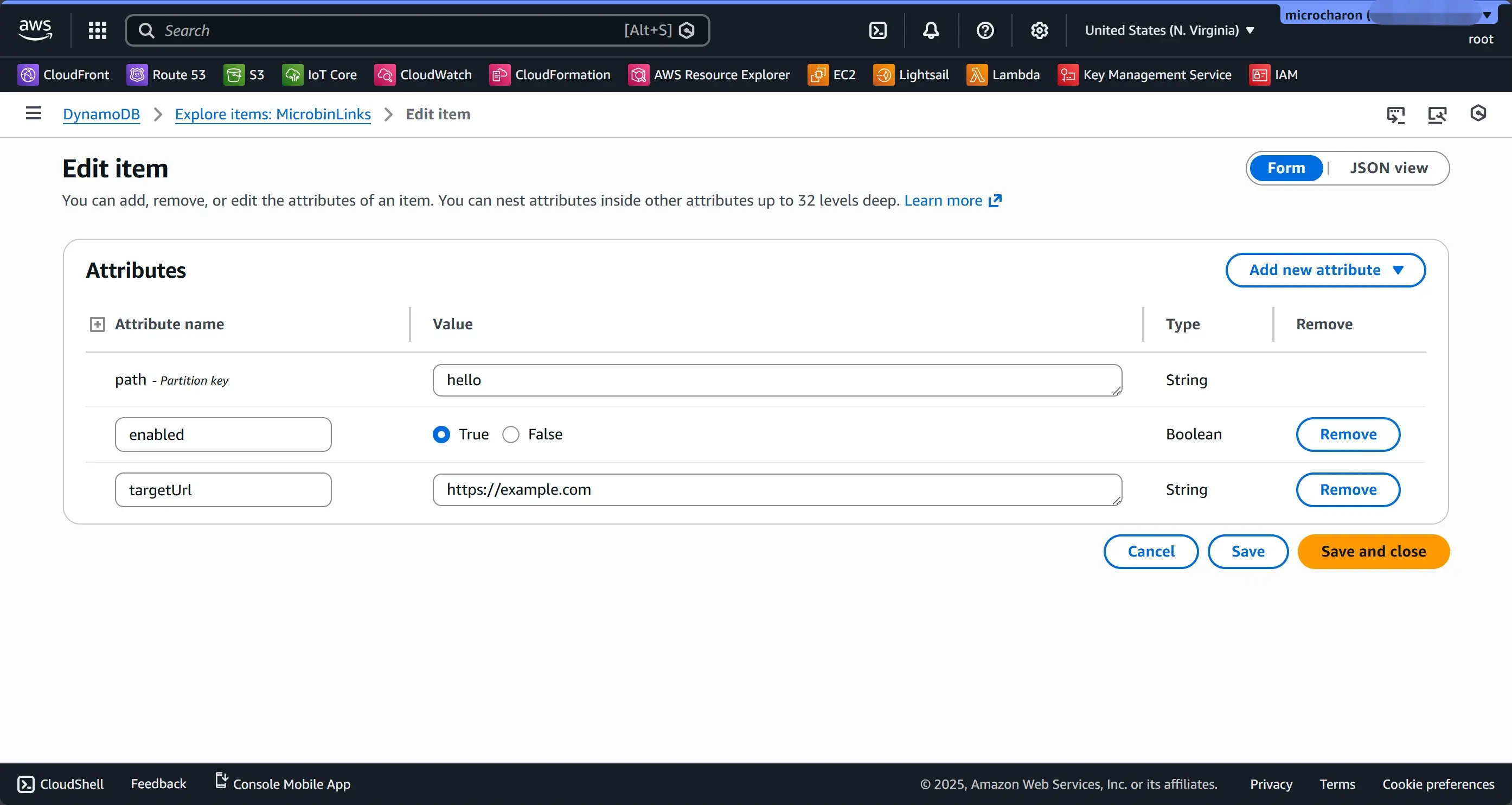
Step 3:手动写一条映射到 DynamoDB
- DynamoDB → Tables →
MicrobinLinks→ Explore table items → Create item 填一个示例:
path(String):hellotargetUrl(String):https://example.comenabled(Boolean):true- (可选)
maxAge(Number):3600
保存。
Step 4:创建 API Gateway(HTTP API),把所有路径转给 Lambda
- 进入 API Gateway → Create API
- 选 HTTP API → Build
- Integrations:选择 Lambda → 选
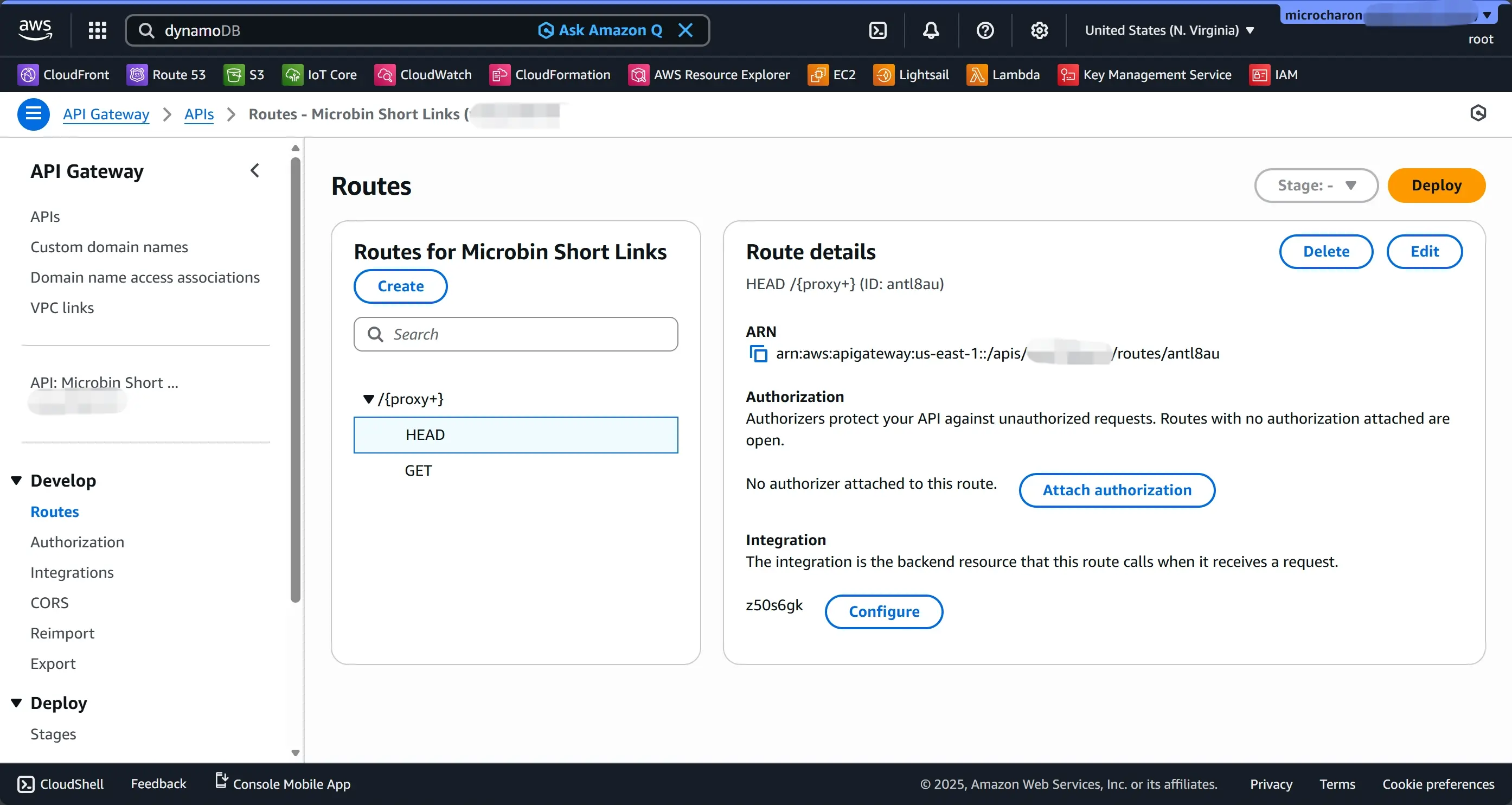
microbin-redirect Configure routes:
- 添加路由:
GET /{proxy+} - (可选)再加:
HEAD /{proxy+}(有些客户端会 HEAD)
- 添加路由:
- Stages:默认
$default即可(auto-deploy 开启) - Create
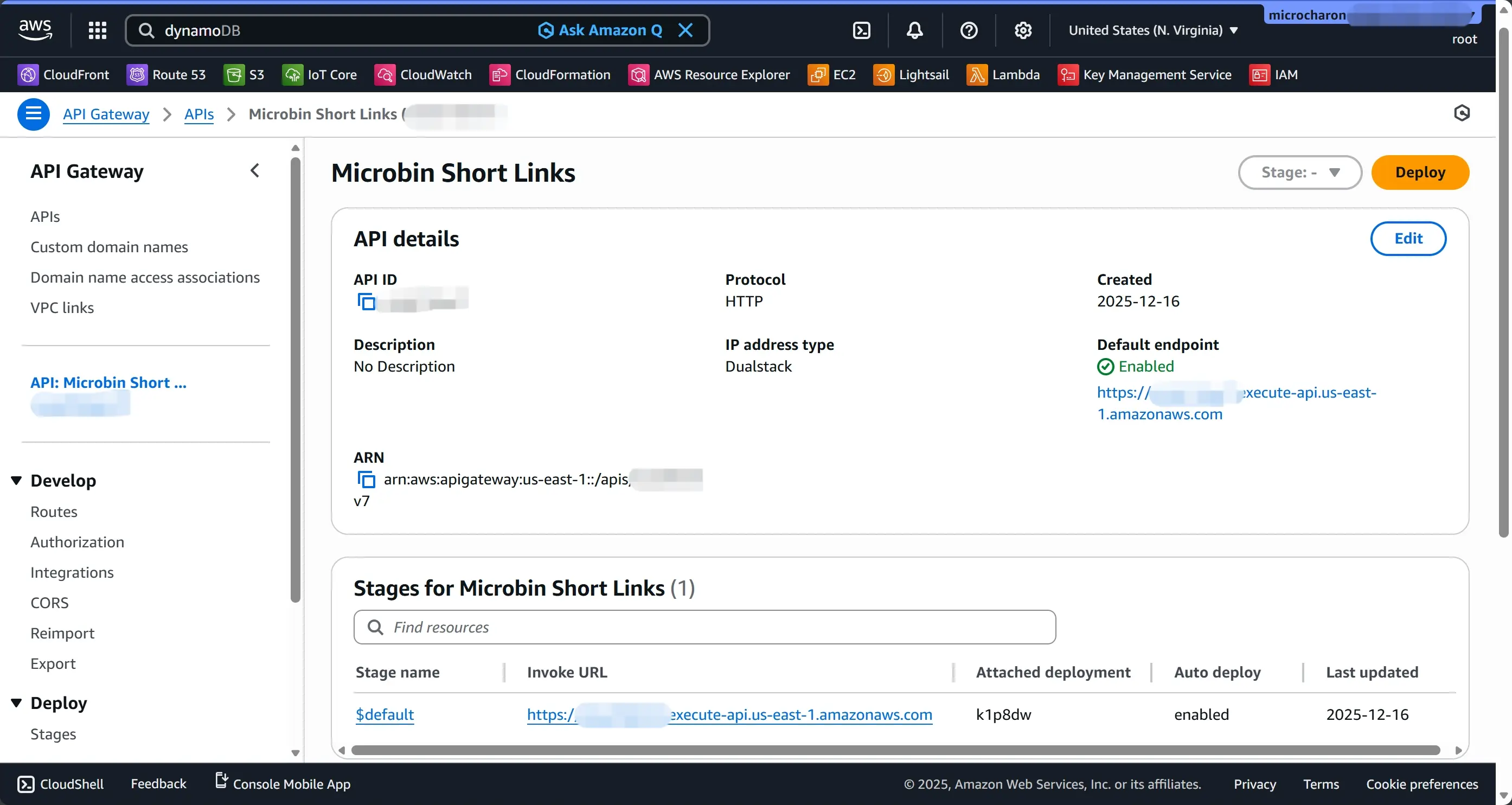
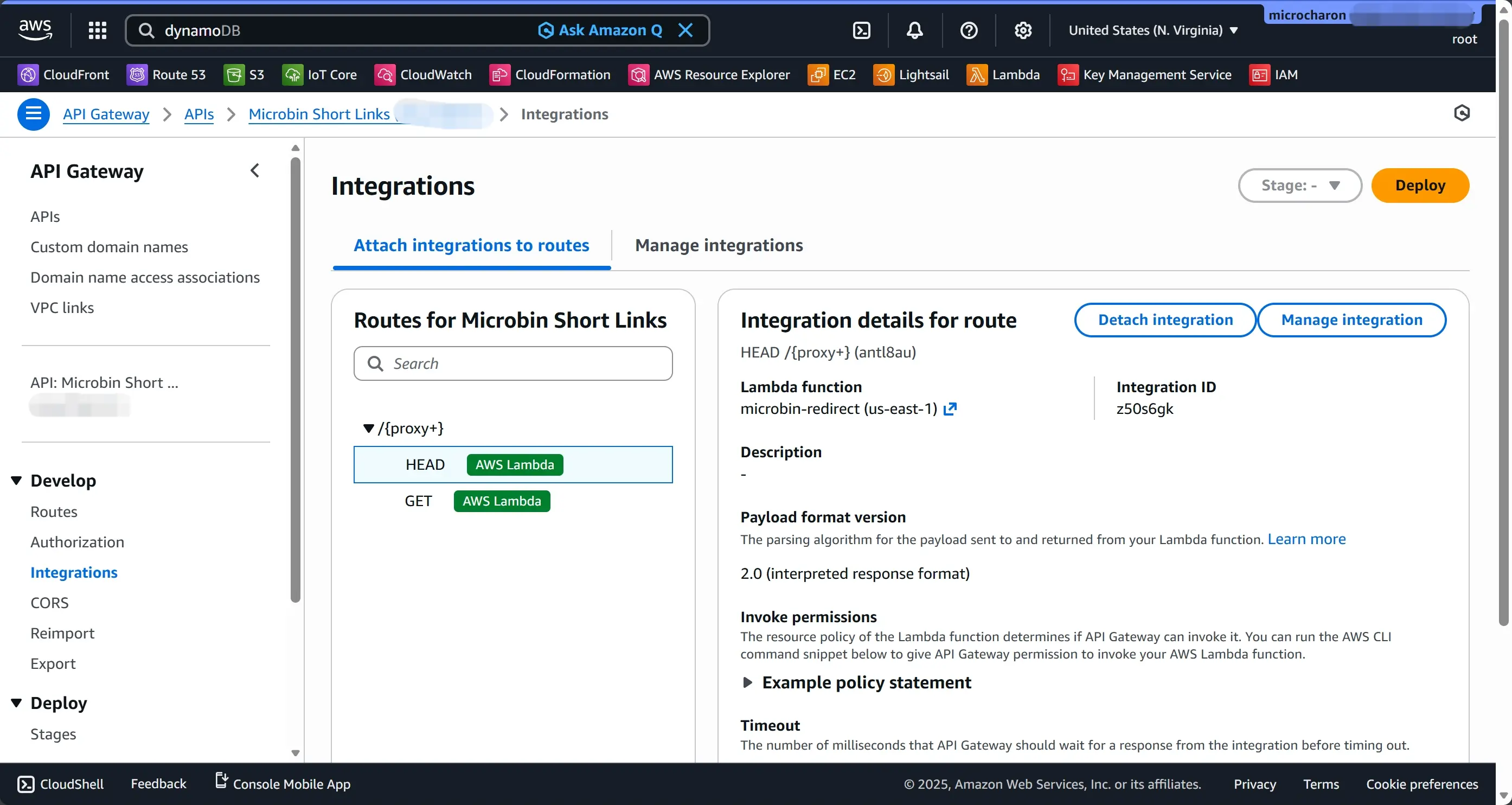
创建后你会拿到一个 invoke URL 类似: https://xxxxxx.execute-api.<region>.amazonaws.com
直接测试 API 是否能 301
浏览器或 curl:
curl -I https://xxxxxx.execute-api.../hello
期望返回:
HTTP/2 301location: https://example.com
如果这里不对,先别动 CloudFront,先排 Lambda / DDB / route。
Step 5:把 CloudFront 的 Origin 指到 API Gateway
已经创建好 CloudFront 分配(distribution),接下来把它“接上” API。
- CloudFront → 选中你的 distribution → Origins → Create origin
Origin domain:
- 选择你的 API Gateway 域名:
xxxxxx.execute-api.<region>.amazonaws.com
- 选择你的 API Gateway 域名:
Origin path:
- 如果你用
$defaultstage,一般不需要填
- 如果你用
- Protocol:HTTPS Only
- Create origin
Step 6:配置 CloudFront Behavior
- CloudFront → distribution → Behaviors → Create behavior
- Path pattern:
* - Origin:选刚刚创建的 API origin
- Viewer protocol policy:Redirect HTTP to HTTPS
- Allowed HTTP methods:GET, HEAD
Cache policy:
- 建议用默认的 Managed-CachingDisabled
- 后面你可以自定义一个 policy:不转发 query/header/cookie,让缓存 key 只有 path
Origin request policy:
- 选 Managed-AllViewerExceptHostHeader
- 或更严格:只转发必要的(后续优化)
- Response headers policy:可暂不设置
- Create behavior
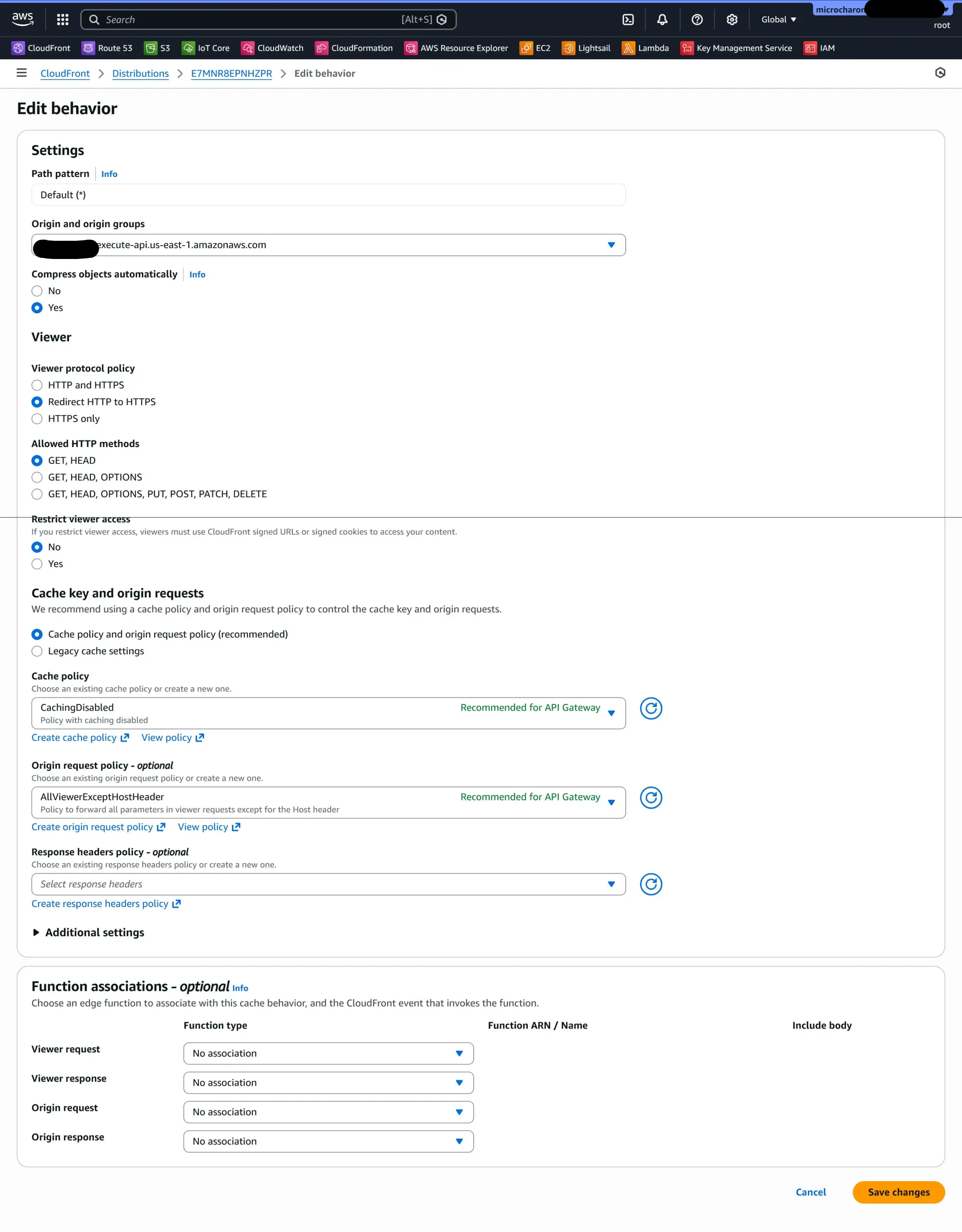
如果你 distribution 里已经有默认 behavior,需要确认默认 behavior 的 origin 指向 API,否则你访问根路径可能还走错 origin。
Step 7:绑定自定义域名 + 证书
CloudFront 要用自定义域名,需要 ACM 证书(必须在 us-east-1)。
7.1 申请证书
- 切换 AWS 区域到 N. Virginia (us-east-1)
- ACM → Request certificate → Public certificate
添加域名:
link.microbin.dev*.link.microbin.dev
- 验证方式选 DNS
- ACM 会给你 CNAME 记录
7.2 在 Cloudflare 加 ACM 的 DNS 验证记录
去 Cloudflare → microbin.dev → DNS → Add record:
- Type:CNAME
- Name:ACM 给你的那串(类似
_xxxx.link.microbin.dev,Cloudflare 里通常只填_xxxx) - Target:ACM 给的 target
- Proxy:DNS only
等 ACM 显示 Issued。
7.3 CloudFront 绑定证书与域名
- 回 CloudFront distribution → Settings → Edit
Alternate domain name (CNAME):
- 添加
link.microbin.dev
- 添加
Custom SSL certificate:
- 选你刚签发的证书
- Save changes
Step 8:Cloudflare 把域名指向 CloudFront
CloudFront 会给你一个域名:dxxxxx.cloudfront.net
在 Cloudflare DNS 增加/修改:
- Type:CNAME
- Name:
link - Target:
dxxxxx.cloudfront.net - Proxy:DNS only
等待 DNS 生效。
Step 9:端到端验证(最终效果)
- 先确认 DynamoDB 有
path=hello 访问:
https://link.microbin.dev/hello
- 期望:浏览器直接跳到
https://example.com,或curl -I能看到 301 和 location
搭建管理 API
Step 1:新增 DynamoDB 写入权限
给“管理 Lambda”的执行角色添加权限(最少):
dynamodb:PutItemdynamodb:UpdateItemdynamodb:DeleteItemdynamodb:GetItem- (可选)
dynamodb:Query/Scan(如果要列表功能)
资源:同一张表 MicrobinLinks
Step 2:创建 Admin Lambda(示例:microbin-admin)
提供至少三个接口:
POST /links创建(path 存在则 409)GET /links/{path+}查询DELETE /links/{path+}删除
安全(很重要):先用一个最简单但有效的方案:共享密钥(Admin Token)
- 请求必须带
Authorization: Bearer <ADMIN_TOKEN> - Lambda 从环境变量读取
ADMIN_TOKEN,不匹配直接 401
2.1 写 microbin-admin Lambda 代码
import { DynamoDBClient } from "@aws-sdk/client-dynamodb";
import { DynamoDBDocumentClient, GetCommand, PutCommand, DeleteCommand } from "@aws-sdk/lib-dynamodb";

const ddb = DynamoDBDocumentClient.from(new DynamoDBClient({}));

const TABLE_NAME = process.env.TABLE_NAME;
const ADMIN_TOKEN = process.env.ADMIN_TOKEN;

// Reserved prefixes (comma-separated) to avoid conflicts
const RESERVED_PREFIXES = (process.env.RESERVED_PREFIXES ?? "admin,__admin,api,.well-known")
  .split(",")
  .map((s) => s.trim())
  .filter(Boolean);

function json(statusCode, bodyObj) {
  return {
    statusCode,
    headers: {
      "Content-Type": "application/json; charset=utf-8",
      // English comment: disable caching for admin endpoints
      "Cache-Control": "no-store"
    },
    body: JSON.stringify(bodyObj)
  };
}

function getAuthToken(event) {
  // English comment: API Gateway HTTP API header keys can vary in casing
  const headers = event?.headers ?? {};
  return headers.authorization ?? headers.Authorization ?? "";
}

function requireAuth(event) {
  const auth = getAuthToken(event);
  if (!ADMIN_TOKEN) return false;
  return auth === `Bearer ${ADMIN_TOKEN}`;
}

function normalizePath(input) {
  // English comment: normalize user input path
  const s = String(input ?? "").trim();
  const noLeading = s.startsWith("/") ? s.slice(1) : s;
  const noTrailing = noLeading.replace(/\/+$/, "");
  return noTrailing;
}

function isReserved(path) {
  if (!path) return true;
  const first = path.split("/")[0];
  return RESERVED_PREFIXES.includes(first);
}

function validateTargetUrl(url) {
  const u = String(url ?? "").trim();
  return u.startsWith("https://") || u.startsWith("http://");
}

export const handler = async (event) => {
  // English comment: This Lambda is designed for API Gateway HTTP API (v2)
  const method = event?.requestContext?.http?.method ?? event?.httpMethod ?? "GET";
  const rawPath = event?.rawPath ?? event?.path ?? "/";
  const routePath = rawPath; // includes leading '/'

  if (!requireAuth(event)) {
    return json(401, { error: "Unauthorized" });
  }

  if (!TABLE_NAME) {
    return json(500, { error: "Missing TABLE_NAME env var" });
  }

  // Route matching:
  // POST   /links
  // GET    /links/{path}
  // DELETE /links/{path}
  if (method === "POST" && routePath === "/links") {
    const body = JSON.parse(event?.body ?? "{}");
    const path = normalizePath(body.path);
    const targetUrl = String(body.targetUrl ?? "").trim();

    if (!path) return json(400, { error: "path is required" });
    if (isReserved(path)) return json(400, { error: "path is reserved" });
    if (!validateTargetUrl(targetUrl)) return json(400, { error: "targetUrl must start with http(s)://" });

    try {
      // English comment: condition write - do not overwrite existing item
      await ddb.send(
        new PutCommand({
          TableName: TABLE_NAME,
          Item: {
            path,
            targetUrl,
            enabled: true,
            createdAt: new Date().toISOString(),
            updatedAt: new Date().toISOString()
          },
          ConditionExpression: "attribute_not_exists(#p)",
          ExpressionAttributeNames: {
            "#p": "path"
          }
        })
      );

      return json(201, { path, targetUrl });
    } catch (err) {
      // ConditionalCheckFailedException => path already exists
      if (err?.name === "ConditionalCheckFailedException") {
        return json(409, { error: "path already exists" });
      }
      return json(500, { error: "internal error", detail: String(err?.message ?? err) });
    }
  }

  // For GET/DELETE, path parameter is read from event.pathParameters for HTTP API with route /links/{path+}
  if ((method === "GET" || method === "DELETE") && routePath.startsWith("/links/")) {
    // Extract everything after "/links/"
    const path = normalizePath(routePath.slice("/links/".length));

    if (!path) return json(400, { error: "path is required" });

    if (method === "GET") {
      const resp = await ddb.send(
        new GetCommand({
          TableName: TABLE_NAME,
          Key: { path }
        })
      );

      if (!resp.Item) return json(404, { error: "not found" });
      return json(200, resp.Item);
    }

    if (method === "DELETE") {
      await ddb.send(
        new DeleteCommand({
          TableName: TABLE_NAME,
          Key: { path }
        })
      );
      return json(200, { deleted: true, path });
    }
  }

  return json(404, { error: "not found" });
};
Step 3:创建 HTTP API(专用于 Admin)
在 API Gateway(HTTP API)中新建一个 API(例如 Microbin Short Link Admin):
路由:
POST /links→ microbin-adminGET /links/{path+}→ microbin-adminDELETE /links/{path+}→ microbin-admin
CORS:允许
console.link.microbin.dev(Vercel 域名)发起请求
例如允许:- Origin:
https://console.link.microbin.dev - Methods:GET, POST, DELETE, OPTIONS
- Headers:Authorization, Content-Type
- Origin:
Step 4:测试 Admin API(curl)
HTTP API invoke URL 大概是: https://xxxxx.execute-api.us-east-1.amazonaws.com
curl -i -X POST "https://xxxxx.execute-api.us-east-1.amazonaws.com/links" \
  -H "Authorization: Bearer YOUR_ADMIN_TOKEN" \
  -H "Content-Type: application/json" \
-d '{"path":"hello2","targetUrl":"https://example.com"}'期望:201
重复创建同一个 path: 期望:409 path already exists
查询
curl -i "https://xxxxx.execute-api.us-east-1.amazonaws.com/links/hello2" \
-H "Authorization: Bearer YOUR_ADMIN_TOKEN"期望:200 + 返回 item JSON
删除
curl -i -X DELETE "https://xxxxx.execute-api.us-east-1.amazonaws.com/links/hello2" \
-H "Authorization: Bearer YOUR_ADMIN_TOKEN"期望:200
Step 5:给 Admin API 绑定自定义域名
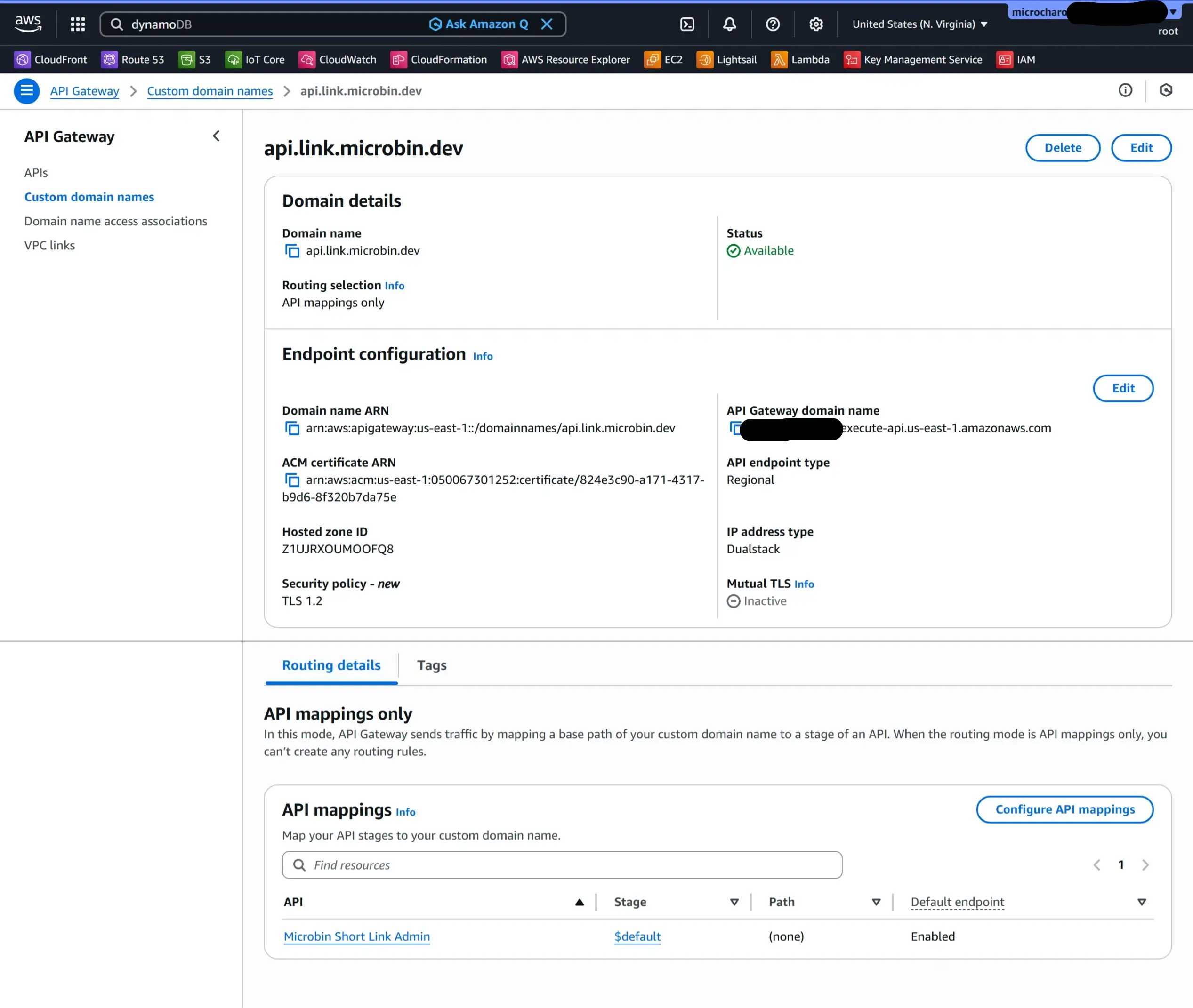
- API Gateway → Custom domain names → Create
- Domain:
api.link.microbin.dev - 证书:ACM(在你的 API 所在 region 申请)
- 绑定 mapping 到你的 HTTP API stage
- Cloudflare DNS:CNAME
api.link.microbin.dev→ API Gateway 给的 target(或 regional domain)
创建管理前端
Step 1:Next.js 项目
Debcharon/microbin-console: Shorten and Custom path for Links
Step 2:Vercel 导入项目
Vercel → Add New → Project → Import Git Repository
Step 3:配置 Vercel 环境变量
Vercel → Project Settings → Environment Variables:
API_BASE_URL=https://api.link.microbin.devADMIN_TOKEN=你在 AWS Admin Lambda 里配置的 token
NEXT_PUBLIC_ 前缀变量会暴露给前端。
绑定域名到 Vercel(Cloudflare)
- Vercel → Project → Settings → Domains → Add:
console.link.microbin.dev Vercel 会提示你在 Cloudflare 加 DNS 记录(通常是):
- CNAME:
console.link→cname.vercel-dns.com
- CNAME:
- 等生效后访问
https://console.link.microbin.dev
参考资料
Debcharon/microbin-console: Shorten and Custom path for Links
教程:利用 API Gateway 使用 Lambda - AWS Lambda
Free Redirect Checker - Analyze URL Redirects, SEO & Security - redirectchecker.org